Property maintenance software that knows what's in every unit
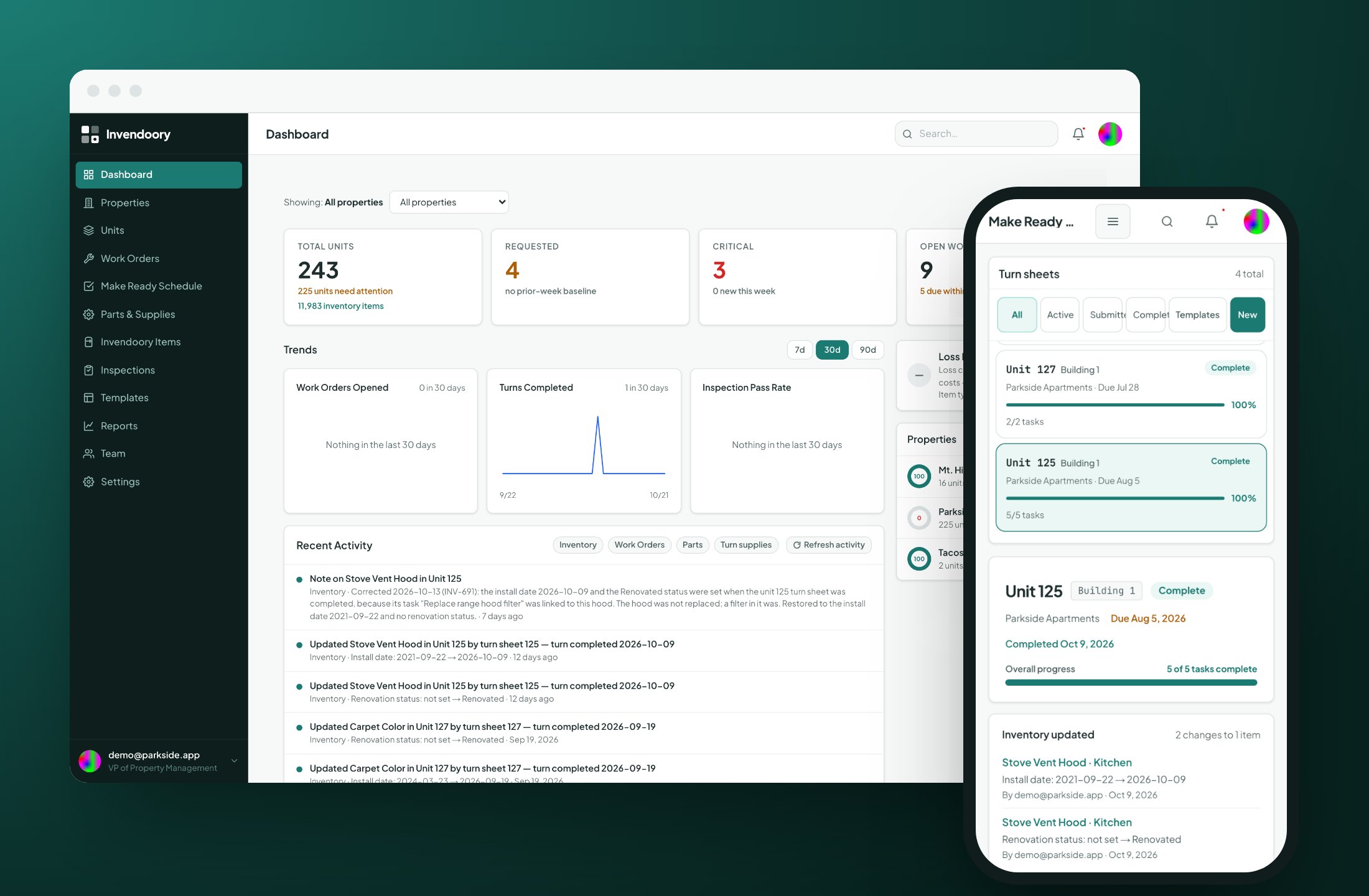
Invendoory records every appliance, finish and fixture, room by room, then runs the inspections, turns and work orders that keep that record accurate. When a turn is verified, the unit’s inventory updates itself.



Your inventory spreadsheet was out of date the day after you finished it
Most apartment teams keep three records that never agree: an inventory workbook, a binder of inspection forms and a make ready whiteboard. A tech swaps a range during a turn, and nobody updates the workbook. An inspector flags a leaking water heater, and the note never becomes a work order. A resident disputes a carpet charge, and nobody can say when the carpet went in.
Generic property maintenance software handles one of those jobs. Invendoory connects them. Every inspection, turn and work order starts from what is actually installed in the unit, and finishing the work updates that record. You stop rebuilding the spreadsheet every quarter, and the reports built on it are numbers you can defend to a regional, an insurer or a resident.
One loop instead of five disconnected tools
Each step feeds the next, so the record stays accurate without anyone retyping it.
Know what's installed
Every unit’s items, room by room, with make, model, serial, install date, warranty and photos.
Inspect it
Quarterly, annual and quick inspections score each item and raise areas of concern automatically.
Fix it
Concerns become work orders or turn tasks in one step, assigned to the right tech.
The record updates itself
Verify a turn or complete a replacement, and the new item goes into the unit’s inventory with its history.
Four modules that share one unit record
Asset inventory, inspections, Make Ready and work orders all read from, and write back to, the same room-by-room record of each unit.
Asset inventory with life left on every item
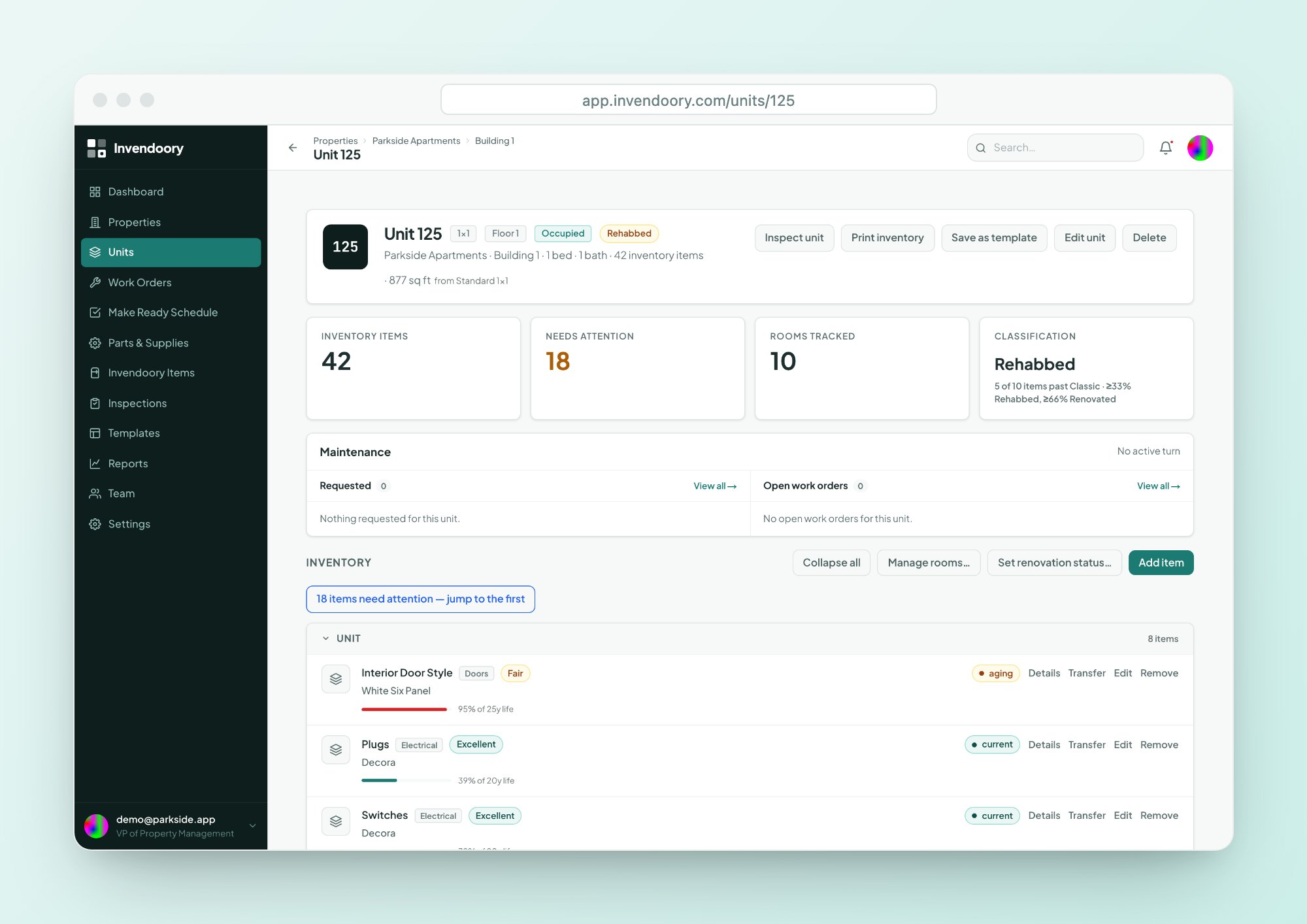
Invendoory Items gives each unit a room-by-room record of every appliance, finish and fixture, with make, model, serial, install date, warranty expiry and up to 20 tagged photos.
- Life-used bar and years left on every item
- Warranty badge, with a heads-up 30 days before it runs out
- “By model” view finds every unit with a recalled appliance
Inspections that turn findings into work
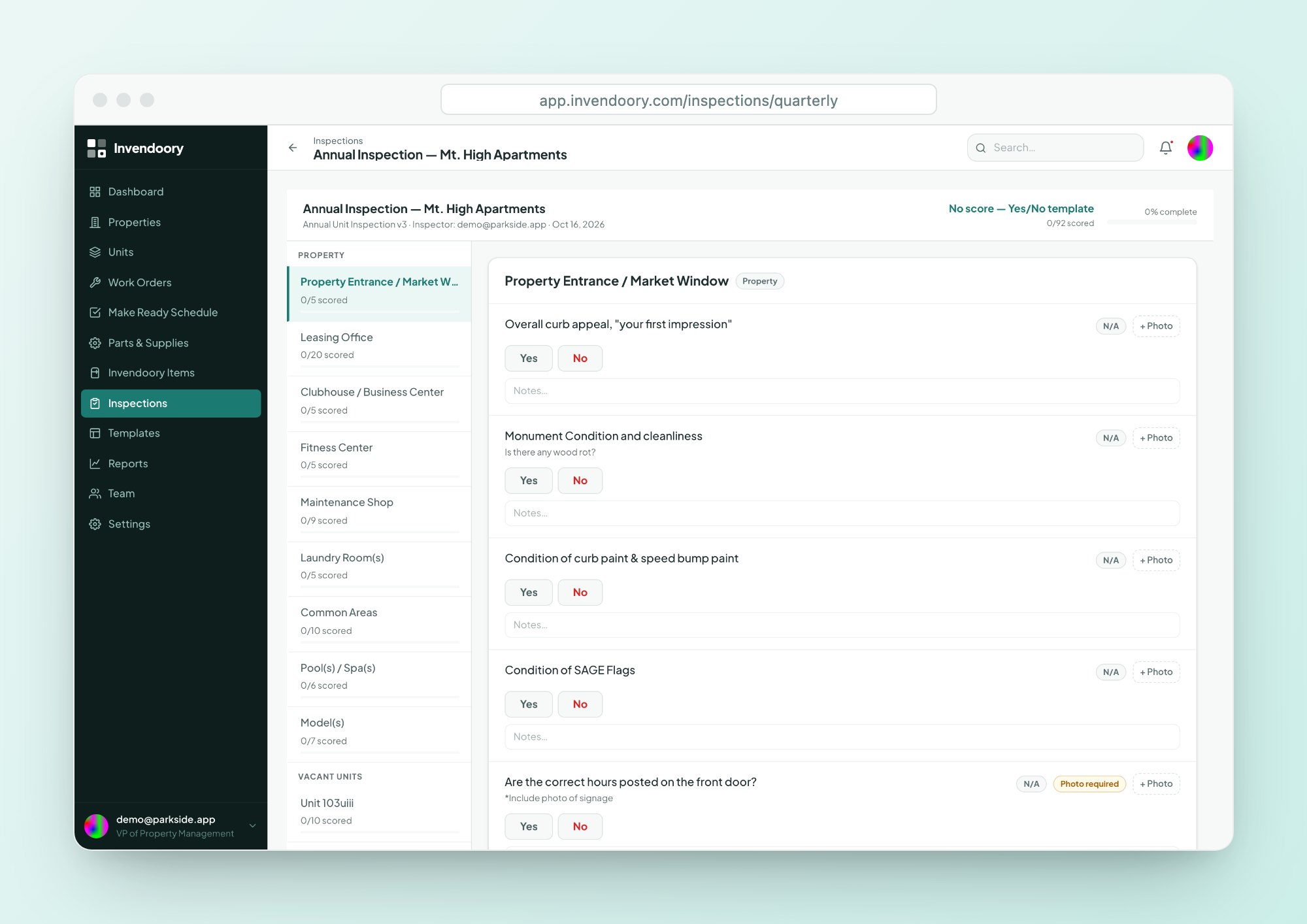
Run the quarterly site inspection, the annual unit inspection or a quick pass/fail check on a phone. Scores update live, and photos carry capture timestamps.
- Low ratings raise areas of concern automatically
- One tap turns a concern into a work order or turn task
- Optional inventory-verification pass on every walk
Make Ready turns that update the inventory
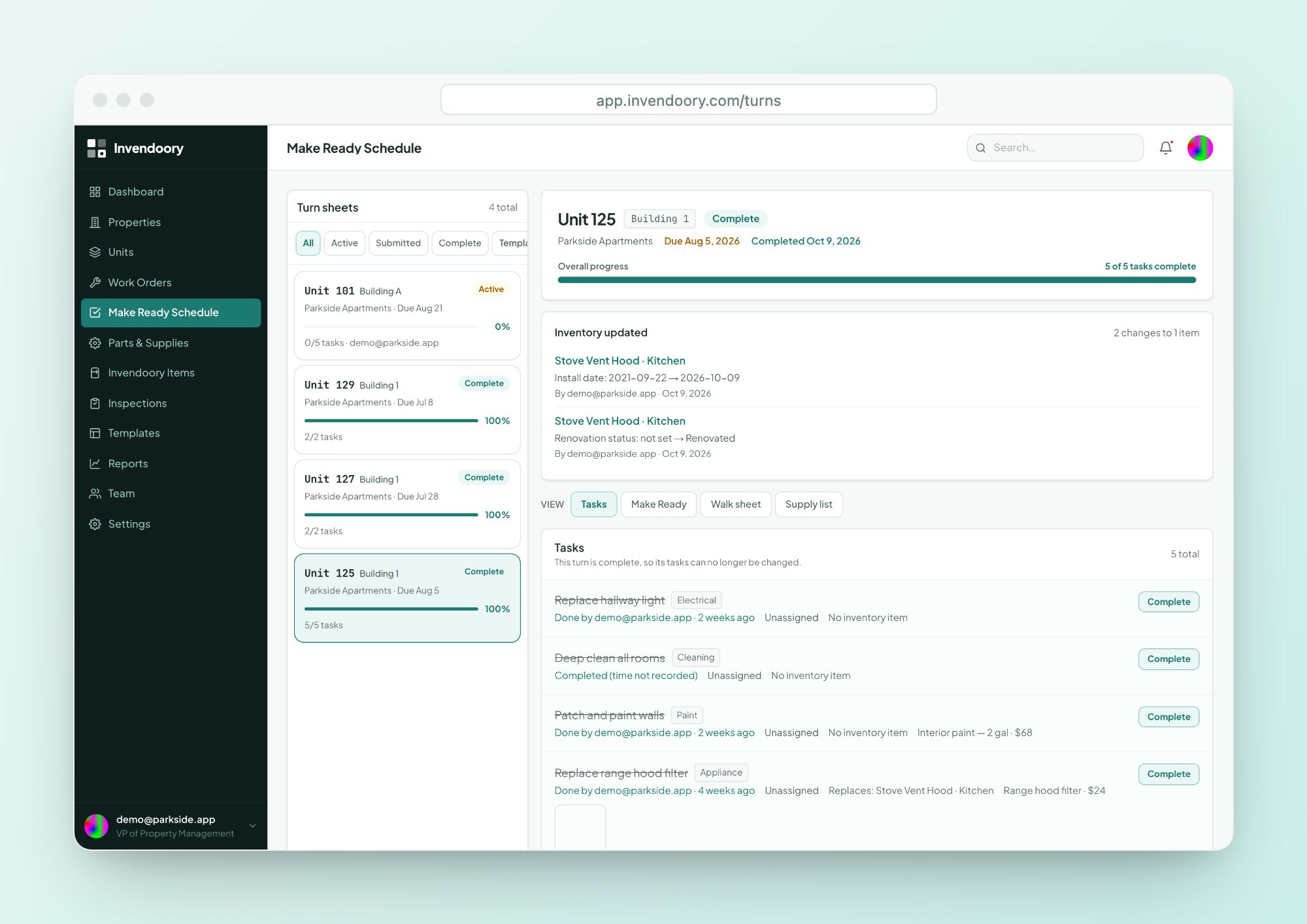
Each vacant unit gets one turn sheet with assigned tasks and a due date. When a property manager verifies it, used supplies come out of stock and replaced items become new installs, dated today.
- Techs move tasks from Not Started to Complete and flag for help
- Turn in, then verify or send back with a reason
- Printable paper walk sheet for crews who want paper
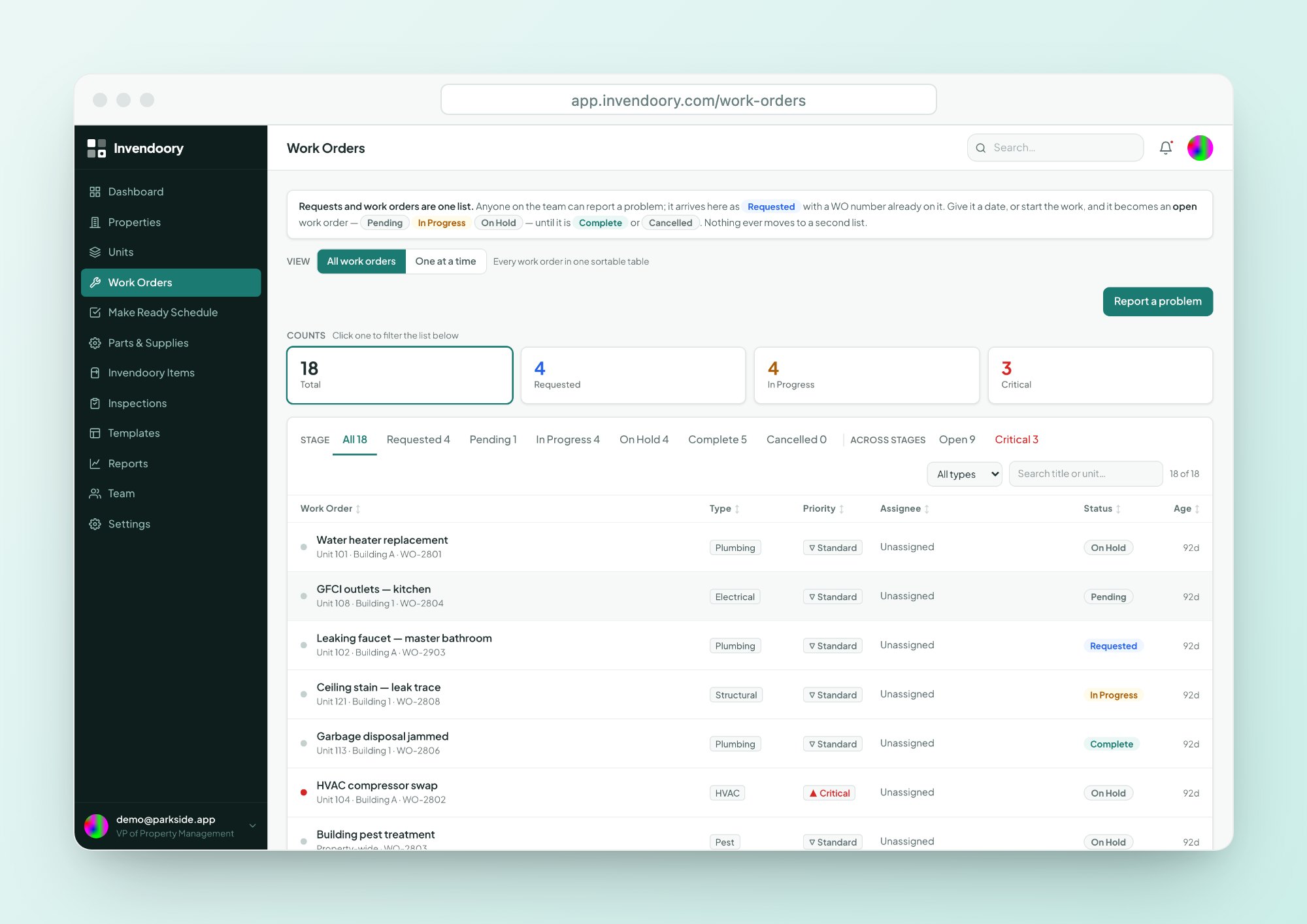
Work orders and parts in one place
Anyone, Leasing included, can report a problem. Requests and work orders share one list and one lifecycle, linked to the unit and the exact appliance.
- Requested, Pending, In Progress, On Hold, Complete
- Compatible parts with stock and cost on every appliance
- Completing a replacement updates the appliance’s record
The reports generic maintenance tools don't have
Invendoory includes eight live reports, and every one exports to CSV and Excel. These four exist because the inventory underneath them is accurate.
Insurance Inventory
Every item in every unit, with model, serial, age, photos and estimated depreciated value.
Prorate Calculator
Move-out charges from each item’s age, expected life and condition, using straight-line depreciation.
Renovation Mix
Classic, Rehabbed and Renovated unit counts by property and across the portfolio.
Loss Detection
Recorded spend against installed value by budget category, flagged above a variance threshold.
Built from a working operator's own paperwork
Not a generic CMMS with an apartment skin
Invendoory was built alongside an apartment operator, from the paper and spreadsheets their team actually used: Parkside’s 225-unit inventory workbook, a scored quarterly site-inspection sheet, a blank quarterly inspection form and a paper make ready walk sheet. Those became the starter templates you get on day one.
That’s why the vocabulary matches how your team already talks. It says make ready, turn sheet, Classic, Rehabbed and Renovated, and areas of concern. It’s also why the building maintenance software pieces, from inspections to parts to work orders, all point back to the same unit record.
Six roles, each seeing what it needs
Permissions run from Leasing to VP and are enforced in the database itself, not just in the screens.
Maintenance technicians
Assigned tasks, item details and compatible parts on the phone. Fix it in one trip.
Maintenance supervisors
Assign turns and work orders, track them live, and keep inspections on schedule.
Property managers
Verify turns, back up resident charges and project the budget from real data.
Regional managers and VPs
Portfolio renovation mix, maintenance performance and Loss Detection.
No migration project required
Bring your spreadsheets
Import units from a CSV or Excel file. Columns are matched automatically, including AppFolio and Buildium export names, and problems are previewed row by row before anything saves.
Set up a building in minutes
Bulk-add up to 1,000 units with floor-based or letter numbering. Unit templates pre-load each floor plan’s rooms and expected items.
Works on the phones you have
A web app built for phones in the field, with big tap targets and camera capture. Nothing to install.
Simple pricing based on units
Two plans, priced by the units you manage. See the full breakdown on the pricing page.
| Plan | Monthly price | Units included | Each additional unit |
|---|---|---|---|
| Basic | $89 | 50 | $3.00 |
| Advanced | $350 | 300 | $1.00 |
Advanced costs less than Basic once you manage more than 137 units.
Questions property managers ask us
What does Invendoory do that other property maintenance software doesn't?
Most property maintenance software tracks work orders. Invendoory starts with an inventory of what’s installed in every unit, then runs inspections, make ready turns and work orders against that record. Finishing the work updates the inventory, so reports like insurance values, move-out charges and renovation mix stay accurate without anyone retyping data.
Does it replace our property management system?
No. Invendoory doesn’t handle leasing, rent or accounting, and it doesn’t integrate with Yardi, AppFolio or other systems. It works alongside your PMS. You can import your units from an AppFolio or Buildium spreadsheet export, so you never type the rent roll twice.
Will my maintenance team actually use it on their phones?
Invendoory is a web app designed down to phone width, with 44-pixel tap targets and camera capture. There’s nothing to install, and techs open it in the browser they already have. It does need a data connection. Assigned tasks, item details and compatible parts are all on the same screen.
How do we get our existing inventory in?
Units import self-serve from CSV or Excel. For item-level inventory, the Invendoory team converts your spreadsheets as a service. We’ve already turned a real operator’s 225-unit workbook into about 10,000 item records.
What does it cost?
Basic is $89 a month with 50 units included and $3.00 for each additional unit. Advanced is $350 a month with 300 units included and $1.00 for each additional unit. See the pricing page for examples at different portfolio sizes.
Can we try it before talking to anyone?
Yes. The live demo opens a working account with sample apartment data. There’s no signup and no customer data, so you can click through turns, inspections and reports on your own time.
See your next turn update the inventory by itself
Open the live demo with sample data, no signup required, or talk to us about your portfolio.